A premise:
I do not use my tiiny connected to a PC, but only to the LAN. All of my apps reside on an Ubuntu server VM created inside my NAS as it's powered on H24.
All my software are just services with a web interface on a specific port, so I only need a web browser to access them. The VM is inside a Zerotier network, so I can access it from my pc at work or from my tablet everywhere in the world.
Everything works fine, but with Tiiny I had a big problem: if I'm not at my home pc (where Tiiny software is installed) how can I download or upgrade models?
So I created (with some help from Tiiny itself) this simple manager as another service on my VM:
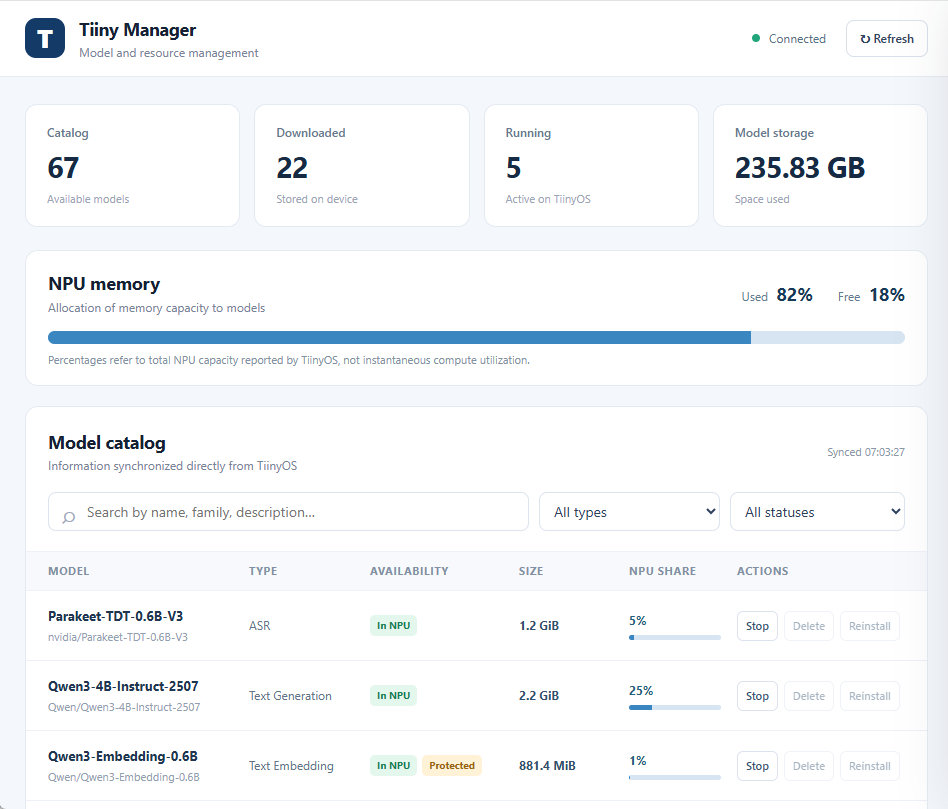
I can check the main parameters of the device and manage all the llms. It also shows when a model can be upgraded and you can do that with a single button (on Tiiny software you have to delete the model and download it again).
Sources are available at this link from my website: https://www.carlomascellani.it/tiiny/manager.zip
Please note that I give no support on the software as I really have no time for this, but your Tiiny can surely help you. The file README.md contains instructions to install it on Ubuntu. I did not test it on other platforms, but there should not be issues on other linux systems (like Raspberry Pi OS) as long as there is Python 3 installed. To run it as a permanent service (so you do not need to run it manually) just ask to your Tiiny.
I hope this can be useful to other people that use Tiiny only LAN connected like me.
#UseCase

The one-click model upgrades are especially useful for people running Tiiny as a standalone device over LAN. This is also great feedback for us on improving native remote model management. Thanks for sharing the code!
Actually the upgrade/reload is just an automation for delete+download, but it's really useful. Glad you can find this useful!
Is this in git somewhere? I'd love to contribute.
Sorry, not in git. Just download from the link. Anyway if you wish you can surely put it on git after downloading it.
This looks really useful! Downloading and updating models from a browser would save me from having to go back to my home PC every time. I’m pretty new to this, so the Ubuntu setup looks a bit tricky, but I’m going to give it a go. Thanks for sharing!
Easier than you can think, especially when you can use ai to get some help...
Thank you for building and sharing this. The model update available is gold and the simple reinstall button is beyond handy. Plus model loading and unloading all done remote - very good work.